.png?width=100&height=100&name=Untitled%20design%20(8).png)
This guide will help you transfer your content to and from Backblaze B2 cloud storage using Cloudsfer—step by step.
Cloudsfer’s integration with Backblaze B2 is designed to quickly and efficiently migrate data to and/or from Backblaze B2 in just a few simple steps.
With this connector, you can migrate, transfer, or back up data between any supported storage and Backblaze B2.
To integrate with Backblaze B2- Please choose the Backblaze B2 connector from the list as shown below:
Step-by-Step Integration with Backblaze B2
Choose the Backblaze B2 connector from the list of available integrations, as shown below.

A pop-up window will appear.
Enter your Backblaze B2 Account ID and Application Key, then click “List Buckets” to retrieve a list of containers in your system.
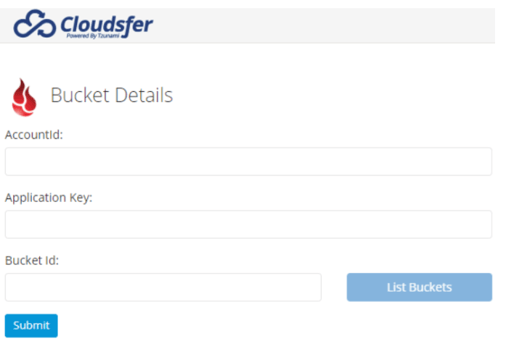
You will now see your Backblaze B2 content structure. Select the content you wish to transfer and click 'Submit.'
Choose any of Cloudsfer’s supported target cloud storage options and click “Create Plan.”
You can create as many migrations plans as needed. Run the migration immediately or schedule it as a daily or weekly backup. (Below image needs to be changed : Old Image > Unable to Connect to BackBlaze with the credentials I have > Will check on Sunday)

Troubleshooting Tip
If you're having trouble loading the bucket list, ensure that Backblaze B2 is allowed to communicate with Cloudsfer.
To do this, go to your Master Application Key, use the Key ID, and then click “List Buckets.”
Refer to the screenshot below for guidance.

Key Features of Cloudsfer’s Backblaze B2 Integration
- Preserves metadata: Modification and upload time stamps are retained.
- Supports versioning: If your bucket is configured to save older versions, Cloudsfer can migrate them.
- Delta migrations: Only newly created and modified data is transferred.
- Backup options: Customize backup frequency and behavior.
- Overwrite capability: Update existing files in the destination with newer versions.
Ready to get started?
Create your FREE Cloudsfer account and begin migrating your data within seconds.
🎉 CLAIM YOUR FREE TRbackIAL NOW!
No prior credit card or commitment required.
For more information or assistance, please contact Cloudsfer Support at:
📧 support@cloudsfer.com